Wednesday, April 12, 2017

Free Source Code on Piece

We have introduced Free Source Code on our website, Piece.
You can download the Source Code for Free and integrate the code in your application.
Please checkout Free source one on Piece - https://www.piece.cool/products/free 

1. Fibonacci sequence generator

The application generate the amount of numbers from the Fibonacci sequence you specified. It can record the result in a text file.
For more details, Please refer to - https://www.piece.cool/products/view/227


2. Realtime Hex Bin Dec Converter

·         This application convert a integer in different bases in realtime.
·         Simply type or paste a integer value in one of the field (decimal, hexadecimal, binary or octal) and it will be converted and displayed in the other formats in realtime. Spaces are added to the displayed values to make them more easily readable.
·         The application uses angular’s two ways binding to display the results in realtime. As the values need processing we use a getter and a setter for each property to be displayed.
·         You can very easily change a displayed format, from octal to base 6 for example by modifying the parameters when calling the “Convert()” method.
For more details, Please refer to - https://www.piece.cool/products/view/272


Login to Piece and enjoy free source code for learning purpose or for your business systems.

For any assistance/queries, please reach us from https://www.piece.cool/contacts or email on info@oneact.jp

Piece Management System

Tuesday, April 4, 2017

AboveTextBox #Illustrator

Seller has added new Source Codes on Piece.
Please check out below new products on Piece.
1. AboveTextBox #Illustrator

With this script, You can draw box behind the upper one from the two selected objects, and fill the box with text color.
This is a script file for Illustrator.
A script is a series of commands that tells Illustrator to perform more tasks. 

For More details log in to Piece.

For any assistance/queries, please reach us from https://www.piece.cool/contacts or email on info@oneact.jp

1.TextBoxの上に

このスクリプトを使用すると、選択した2つのオブジェクトから上部の背後にボックスを描画し、テキストの色でボックスを埋めることができます。
これはIllustrator用のスクリプトファイルです。
スクリプトとは、より多くのタスクを実行するようにIllustratorに指示する一連のコマンドです。

詳細については、Pieceにログインしてください。


ご不明な点がございましたら、
または、

までお問い合わせください。


Tuesday, March 7, 2017

Ionic 2 - カスタマイズ可能なキーボード

Ionic 2 - カスタマイズ可能なキーボード


Pieceにアップロードされた最新のソースコードをチェックしてみてください:

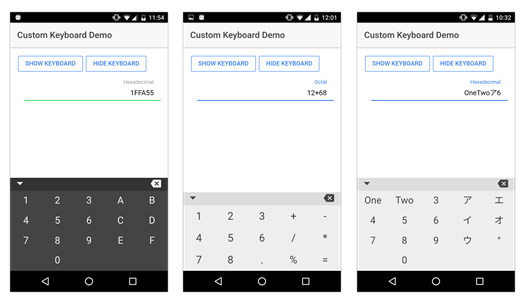
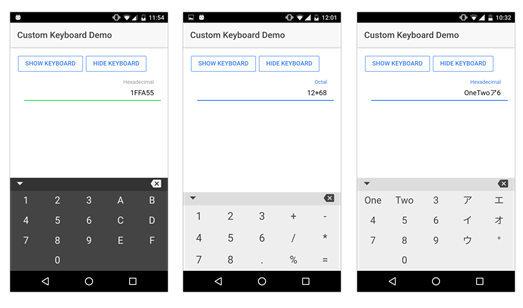
これは、Ionic 2モバイルアプリケーションに統合できる完全にカスタマイズ可能なキーボードコンポーネントです. これにより、モバイルプラットフォームとは独立して、アプリケーションに必要な正確なキーボードを非常に簡単に表示することができます (Android, IOS または Windows Phone).

数字、文字、定義済みの文字列、表示する列の数を定義することによって、キーの値を選択することができます。

あなたのアプリケーションでこのキーボードを使用するのは本当に簡単です! プロジェクト内のコンポーネントファイルをコピーしてインポートし、次のようにページでインスタンス化する準備ができました:

html:
<custom-keyboard [keysTab]=“keysTab" class=“kb-dark”></custom-keyboard>

typescript:
this.keysTab = ["1","2","3","4","5","6","7","8",“9”,“0”]


ダウンロード可能なファイルには、プロジェクトの統合に役立つデモ・アプリケーションも含まれています。

   詳細はこちらへ https://www.piece.cool/products/view/273
   ご不明な点がございましたら、下記までご連絡ください https://www.piece.cool/contacts または上のメール info@oneact.jp.


Ionic 2 - Customisable Keyboard


Check out one of the latest uploaded source code on Piece:

This is a fully customisable keyboard component to integrate in your Ionic 2 mobile application. This will allow you to display very easily the exact keyboard you need for you application, independently of the mobile platforms (Android, IOS or Windows Phone).

You can choose the key values, from numbers, letters to any predefined string, and also the layout by defining the number of columns you want to display!

Using this keyboard in your application is really simple! Just copy the component files in your project, import it and it’s ready to be instantiated in your page like following:

html:
<custom-keyboard [keysTab]=“keysTab" class=“kb-dark”></custom-keyboard>

typescript:
this.keysTab = ["1","2","3","4","5","6","7","8",“9”,“0”]


A demo application is also included in the downloadable files to help you with the integration in your project.

   For more details please go to https://www.piece.cool/products/view/273

   For any assistance/queries, please reach us at https://www.piece.cool/contacts or email on info@oneact.jp.

Sunday, February 12, 2017

"ピース" - 無料ポイントを獲得し、ソースコードを "ピース"で購入する

Pieceは新しいキャンペーンを開始し、新規登録ユーザーに¥150ポイントプレゼントします。
獲得ポイントは、Pieceのソースコードを購入するために使用できます。
ピースに登録して無料ポイントでpieceをお楽しみください。


Piece - Earn Free Points and Purchase Source Code

Piece has started new campaign and user can earn 1.3$ on new registration.
Earned points can be used to buy a source code on Piece.
Please register on Piece and enjoy free points.


Monday, January 30, 2017

ASP.NET Image Editor

ASP.NET Image Editor -  
  1.  ASP.NET Core web application to edit an image,  change contrast, etc..
  2. The application is based on a simple Model View Component architecture.
  3. Image allows to set Brightness, Contrast, Saturation, Rotation and many more adjustments.
  4. Many times it’s necessary to edit the pictures taken to suit your business needs. 

Design Description
The application is based on a simple Model View Component architecture:
• The model: Models\ImageModel.cs, contains all the image properties to be set/get.
• The view: Views\Home\Index.cshtml, contains Html and Javascript/JQuery commands.
• The Controller: Controllers\HomeControler.cs contains the image edition logic.

The edited image is rendered by a view component:
• Views\Shared\Components\EditedImage\Default.cshtml
• ViewComponents\EditedImageViewComponent.cs

  1. For more details refer to - https://www.piece.cool/products/view/257
  2. For any assistance/queries, please reach us from https://www.piece.cool/contacts or email on info@oneact.jp.