Tuesday, March 7, 2017

Ionic 2 - カスタマイズ可能なキーボード

Ionic 2 - カスタマイズ可能なキーボード


Pieceにアップロードされた最新のソースコードをチェックしてみてください:

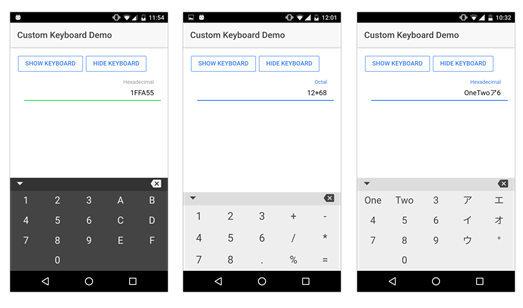
これは、Ionic 2モバイルアプリケーションに統合できる完全にカスタマイズ可能なキーボードコンポーネントです. これにより、モバイルプラットフォームとは独立して、アプリケーションに必要な正確なキーボードを非常に簡単に表示することができます (Android, IOS または Windows Phone).

数字、文字、定義済みの文字列、表示する列の数を定義することによって、キーの値を選択することができます。

あなたのアプリケーションでこのキーボードを使用するのは本当に簡単です! プロジェクト内のコンポーネントファイルをコピーしてインポートし、次のようにページでインスタンス化する準備ができました:

html:
<custom-keyboard [keysTab]=“keysTab" class=“kb-dark”></custom-keyboard>

typescript:
this.keysTab = ["1","2","3","4","5","6","7","8",“9”,“0”]


ダウンロード可能なファイルには、プロジェクトの統合に役立つデモ・アプリケーションも含まれています。

   詳細はこちらへ https://www.piece.cool/products/view/273
   ご不明な点がございましたら、下記までご連絡ください https://www.piece.cool/contacts または上のメール info@oneact.jp.


Ionic 2 - Customisable Keyboard


Check out one of the latest uploaded source code on Piece:

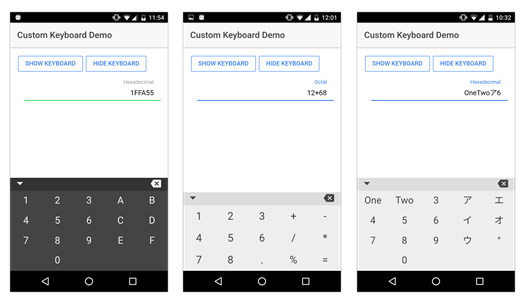
This is a fully customisable keyboard component to integrate in your Ionic 2 mobile application. This will allow you to display very easily the exact keyboard you need for you application, independently of the mobile platforms (Android, IOS or Windows Phone).

You can choose the key values, from numbers, letters to any predefined string, and also the layout by defining the number of columns you want to display!

Using this keyboard in your application is really simple! Just copy the component files in your project, import it and it’s ready to be instantiated in your page like following:

html:
<custom-keyboard [keysTab]=“keysTab" class=“kb-dark”></custom-keyboard>

typescript:
this.keysTab = ["1","2","3","4","5","6","7","8",“9”,“0”]


A demo application is also included in the downloadable files to help you with the integration in your project.

   For more details please go to https://www.piece.cool/products/view/273

   For any assistance/queries, please reach us at https://www.piece.cool/contacts or email on info@oneact.jp.

Sunday, February 12, 2017

"ピース" - 無料ポイントを獲得し、ソースコードを "ピース"で購入する

Pieceは新しいキャンペーンを開始し、新規登録ユーザーに¥150ポイントプレゼントします。
獲得ポイントは、Pieceのソースコードを購入するために使用できます。
ピースに登録して無料ポイントでpieceをお楽しみください。


Piece - Earn Free Points and Purchase Source Code

Piece has started new campaign and user can earn 1.3$ on new registration.
Earned points can be used to buy a source code on Piece.
Please register on Piece and enjoy free points.


Monday, January 30, 2017

ASP.NET Image Editor

ASP.NET Image Editor -  
  1.  ASP.NET Core web application to edit an image,  change contrast, etc..
  2. The application is based on a simple Model View Component architecture.
  3. Image allows to set Brightness, Contrast, Saturation, Rotation and many more adjustments.
  4. Many times it’s necessary to edit the pictures taken to suit your business needs. 

Design Description
The application is based on a simple Model View Component architecture:
• The model: Models\ImageModel.cs, contains all the image properties to be set/get.
• The view: Views\Home\Index.cshtml, contains Html and Javascript/JQuery commands.
• The Controller: Controllers\HomeControler.cs contains the image edition logic.

The edited image is rendered by a view component:
• Views\Shared\Components\EditedImage\Default.cshtml
• ViewComponents\EditedImageViewComponent.cs

  1. For more details refer to - https://www.piece.cool/products/view/257
  2. For any assistance/queries, please reach us from https://www.piece.cool/contacts or email on info@oneact.jp.


Wednesday, January 25, 2017

Piece - PDF Generator Tool

PDF Generator Tool -
  1. Piece offers a new PDF generator tool.
  2. The application convert a text or image file to PDF format
  3. Advantage for using PDF file:
  • One of the most important factors is that other documents formats use different fonts : If you create a Word document using a fancy font, the other person you send it or share it, may not have it. If they do not have the same font installed on their computer, the document will not be readable. Because fonts are embedded into PDF files, that issue is never a problem.
  • For anyone who doesn’t want someone stealing or modifying their work, PDF files are a must have. Once a file is converted into PDF format, it cannot be modified.
  • PDF file format is very compact, so file size is small enough to easily e-mail to your recipients.
  • PDF documents is viewable by any computer platforms (Apple® Macintosh®, Microsoft® Windows® or any flavor of the UNIX® operating system).
  • PDF documents can be magnified hundreds of times, with minimal degradation of quality, making it easier to read or view fine details.
  • PDF documents act as color, electronic fax machines but with much higher quality and speed. Documents can be distributed worldwide for practically no cost and can then be printed in any quantity anywhere.
  • PDF file format is essential for business documents like agreements and forms that must retain their exact appearance for legal reasons. For example, this may apply to application forms, tax returns, licence agreements, tender documents, quotations, invoices and logos.
  1. Our tool on Piece helps you to convert any type of document into PDF file quickly.
  2. For more details refer to - https://www.piece.cool/products/view/225

  1. For any assistance/queries, please reach us from https://www.piece.cool/contacts or email on info@oneact.jp.


Monday, January 23, 2017

ASP.NET Tree View Folder development control


We have added ASP.NET Tree View Folder development control.
Description -
  1. Create a tree view structure with no level limit for web pages.
  2. Collaborate JavaScript and ASP.NET to create Ajax mechanism.
  3. Generate tree view which node data from Database.
  4. Completed functions implemented(Create/Edit/Delete).
  5. Tree View structure build with recursive functions.
  6. Web client code use jQuery Ajax.
  7. C# client retrieve data from SQL Server.
  8. Server side return JSON format to client.
Please refer to https://www.piece.cool/products/view/246  for more details.

For any assistance/queries, please reach us from https://www.piece.cool/contacts or email on info@oneact.jp.